Files in Sharetribe
Sharetribe supports uploading and downloading files and attaching them to different marketplace resources.
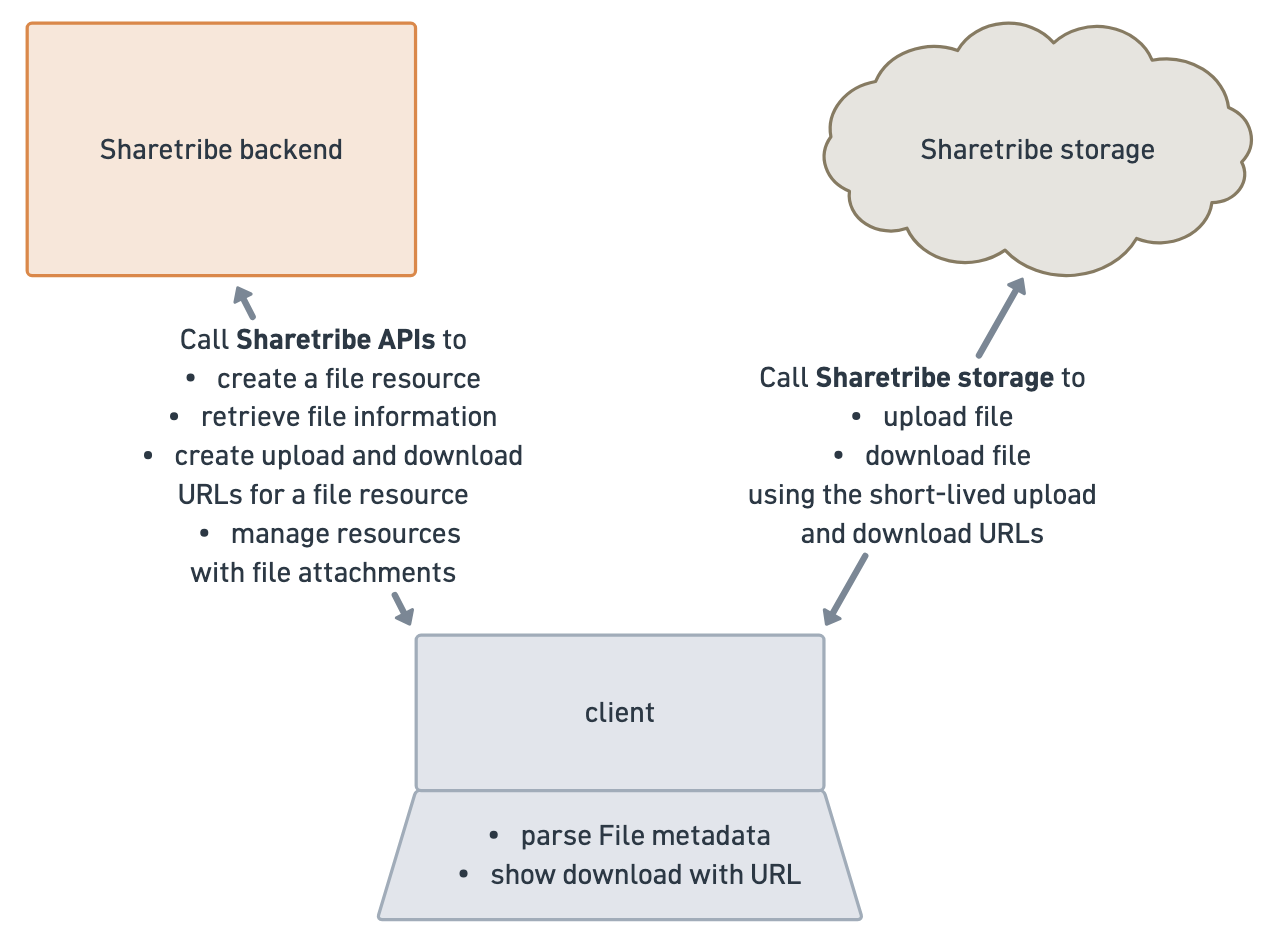
The file information and relationships to other resources is stored in the Sharetribe backend and available through the Sharetribe APIs. The file entities themselves are stored in a third-party storage, and you need to call the Sharetribe APIs to request unique signed upload and download URLs to access the actual file entities.
Permissions
Uploading and downloading files is enabled by default. Operators can disable uploading and downloading files across the marketplace in Access control. When uploads and downloads are disabled in Console > General > Access control, file upload and download endpoints will throw a 403 Forbidden error.
In addition, you can use for instance listing types to enable or disable specific use cases for files in your marketplace, if files are enabled.
File and FileAttachment
In the Sharetribe system, file and fileAttachment represent two
different things:
- A
filerepresents a single uploaded digital file resource - A
fileAttachmentis a file’s connection to another resource, such as a message.
A file is a related resource to a fileAttachment, and a
fileAttachment is a related resource of another resource, for example
a message. In this structure, it is possible for a file to have
fileAttachment links to multiple different resources.
When querying the resource, you’ll need to include both the file attachments relationship and the nested file relationship if you want to retrieve both.
const messages = await sdk.messages.query({
  transaction_id: txId,
  include: ['publicFileAttachments', 'publicFileAttachments.file'],
});
// messages.query API response with included
// publicFileAttachments and publicFileAttachments.file
{
"data": [
{
"id": {
"uuid": "69fd886a-96b2-4ba1-b458-cda5fdc0616e"
},
"type": "message",
"attributes": {
"content": "message content",
"createdAt": "2026-05-08T06:53:30.043Z",
"deleted": false
},
// publicFileAttachments is a relationship to message
"relationships": {
"publicFileAttachments": {
"data": [
{
"id": {
"uuid": "69fd886a-1924-41c5-bfe1-a43deb7e1c3b"
},
"type": "fileAttachment"
}
]
}
}
}
],
"included": [
{
// this is the file resource that has a relationship to fileAttachment
"id": {
"uuid": "69fd8859-8380-49c0-ab7e-0ee502e40811"
},
"type": "file",
"attributes": {
"name": "File to be uploaded.pdf",
"state": "available",
"mimeType": "application/pdf",
"size": 10697,
"deleted": false
}
},
// This message has one fileAttachment in its publicFileAttachments array
{
"id": {
"uuid": "69fd886a-1924-41c5-bfe1-a43deb7e1c3b"
},
"type": "fileAttachment",
"attributes": {
"scope": "public",
"deleted": false
},
// file is a relationship to fileAttachment
"relationships": {
"file": {
"data": {
"id": {
"uuid": "69fd8859-8380-49c0-ab7e-0ee502e40811"
},
"type": "file"
}
}
}
}
],
"meta": {
"totalItems": 1,
"totalPages": 1,
"page": 1,
"perPage": 100
}
}An operator can delete a file attachment to disconnect a resource from a
file, or they can delete the file itself so that all resources linked to
the file lose access. When attaching files to messages, a single file is
only attached to a single message at a time, so when an operator deletes
a file associated with a message, both the fileAttachment and the
file are deleted.
ownFile and file
A file can have multiple states:
- pendingUpload
- pendingVerification
- available
- verificationFailed.
File resources are immutable, so updating an existing file resource is not possible.
To fetch a public file resource, you’ll need to use the id of the
associated fileAttachment, as the fileAttachment resource contains
the scope information that informs whether the API caller should have
access to the resource.
const file = await sdk.files.show({ fileAttachmentId }).data.data;"file": {
"id": {
"uuid": "69fd8859-8380-49c0-ab7e-0ee502e40811"
},
"type": "file",
"attributes": {
"name": "File to be uploaded.pdf",
"state": "available",
"mimeType": "application/pdf",
"size": 10697,
"deleted": false
}
}There’s also an ownFile resource, which is the author’s expanded
version of the file. In addition to the public attributes, the
ownFileresource also shows when the resource was created and when the
state was updated.
To fetch an ownFileresource, you’ll need to use the id of the file
resource, not the file attachment resource.
const ownFile = await sdk.ownFiles.show({ id: fileId }).data.data;"ownFile": {
"id": {
"uuid": "69fd8859-8380-49c0-ab7e-0ee502e40811"
},
"type": "ownFile",
"attributes": {
"name": "File to be uploaded.pdf",
"mimeType": "application/pdf",
"size": 10697,
"state": "available",
"createdAt": "2026-05-08T06:53:13.091Z",
"stateUpdatedAt": "2026-05-08T06:53:25.880Z"
}
}Visibility
A file is first uploaded by creating an ownFile resource, which is
visible to the creator of the resource. An ownFile can then be
attached to another resource.
Once a file has been attached to another resource, it becomes also
visible as a file resource according to the scope of the corresponding
fileAttachments attribute:
publicFileAttachmentsare visible to all users who have access to the resource in questionprotectedFileAttachmentsare visible to the user who created the resource, and additionally the file can be revealed in a transaction to the other transaction participantprivateFileAttachmentsare visible only to the user who created the resource.
You can review the API reference to see which resources have which scopes of file attachments available.
In addition, operators have visibility to files and file attachments in Console. For example, files attached to messages are visible in the Console transaction details.
File storage
Files are both uploaded to and downloaded from storage directly using pre-signed URLs – not using Sharetribe API endpoints.
For uploads, this means that a user first creates the file resource in Sharetribe, and then fetches a time-limited signed URL connected to that specific file resource that allows uploading the file to storage.
const uploadDetails = sdk.fileUploads.create({ fileId }).data.data;"uploadDetails": {
"id": {
"uuid": "63abdec4-85e7-4157-8e99-2e2c7465d8be"
},
"type": "fileUpload",
"attributes": {
"fileId": {
"uuid": "69fd8859-8380-49c0-ab7e-0ee502e40811"
},
"url": "https://unique-signed-sharetribe-upload-url.com",
"headers": {
"Content-Type": "application/pdf"
},
"method": "PUT",
"expiresAt": "2026-05-08T08:16:30.988Z"
}
}For downloads, the user makes a POST request for a short-lived download URL for the file from Sharetribe API, and uses that generated URL to fetch the file from storage. There are two different download endpoints that use different ids, similarly to how files/show and own_files/show:
- own_file_downloads/create (sdk.ownFileDownloads.create) for ownFile
resources, where the parameter is the
fileid - file_downloads/create (sdk.fileDownloads.create) for file resources,
where the parameter is the
fileAttachmentid
const downloadDetails = isOwnFile
  ? sdk.ownFileDownloads.create({ fileId }).data.data
: sdk.fileDownloads.create({ fileAttachmentId }).data.data;"downloadDetails": {
"id": {
"uuid": "fd76299c-1be6-4250-8de6-10b1d8f9cb9e"
},
"type": "fileDownload",
"attributes": {
"fileId": {
"uuid": "69fd8859-8380-49c0-ab7e-0ee502e40811"
},
"url": "https://unique-signed-sharetribe-download-url.com",
"expiresAt": "2026-05-08T08:29:28.089Z"
}
}Since both upload URLs and download URLs are short-lived, it’s not
possible to save them in a resource’s extended data for reuse. Both
resources have an expiresAt attribute that indicates how long they are
valid.
Security
When a file is uploaded, the Sharetribe backend runs a security verification to ensure that the file is safe to handle and distribute, for example that it does not have malware. In addition, the backend verifies that the file mime type is acceptable and the size is less than 1GB.
Files can be attached to resources once they’ve been uploaded, even if they have not yet been verified. The Sharetribe backend processes the verification asynchronously, and the file becomes available if the verification succeeds. If you want to show the file as available immediately when verification succeeds, your client will need to poll the file to determine when it becomes available.